

If you’ve ever used a printer to produce multiple copies of a document, you’ve probably come across the term collate. But what exactly does it mean, especially when printing multiple copies, double-sided prints, or PDFs? Whether you’re printing documents for work, school, or personal use, understanding the process of collating can make a huge difference in how your printed materials are organized.
In simple terms, collating refers to the order in which pages are printed when you request multiple copies of a document. But there’s a bit more to it than that, especially when you’re dealing with double-sided printing or PDFs. Let’s dive deeper into what collating means and why it’s important in the printing world.
What Does Collate Mean When Printing?
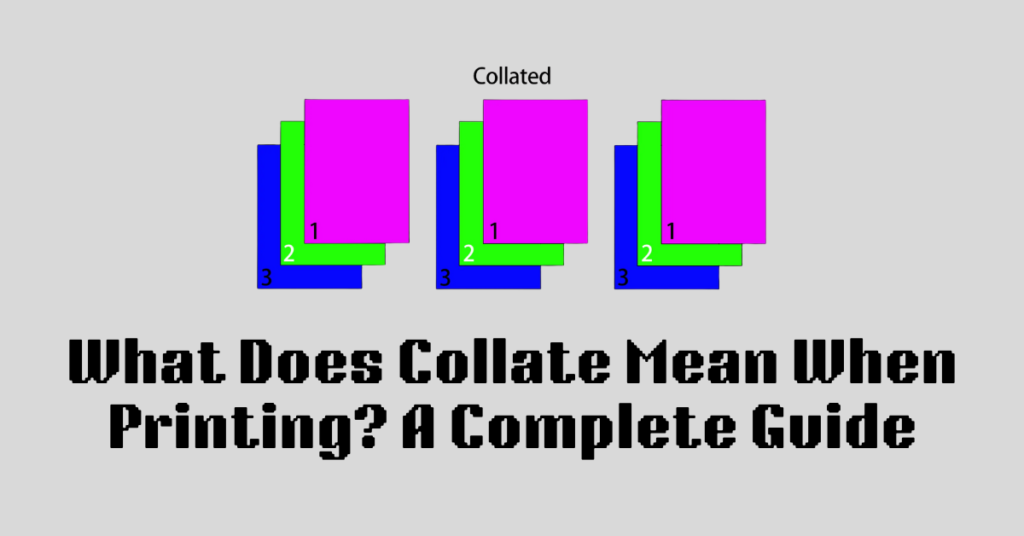
When you select the collate option on your printer, you’re essentially instructing the printer to organize the pages in the correct order after printing. This is particularly useful when you’re printing multiple copies of a multi-page document.
For example, imagine you need to print five copies of a 10-page report. If you don’t choose to collate, your printer will print all the pages in sequence (pages 1-10) five times. You’ll end up with five separate stacks of pages, and you’ll have to manually organize them into individual reports. On the other hand, if you choose to collate, the printer will print pages 1 to 10 in order for the first copy, then print pages 1 to 10 again for the second copy, and so on, so you get five neatly organized complete reports.
Why Collating Matters:
-
Saves Time: Collating eliminates the need to manually arrange the pages.
-
Keeps Documents Organized: Whether it’s for business or personal use, a collated print job looks professional and organized.
-
Efficient: Especially useful for multi-page documents or bulk printing.
What Does Collate Mean When Printing Multiple Copies?
When you’re printing multiple copies of the same document, collating ensures that each set of pages is printed in the correct order. Without collating, you’d get a pile of the same pages in a non-sequential order. This could lead to confusion and wasted time trying to organize the pages.
For example, with collating turned on, if you’re printing two copies of a 5-page document, the printer will first print pages 1 to 5 for the first copy, then print pages 1 to 5 again for the second copy. With collating off, the printer will print all the 5-page sets first (pages 1, 2, 3, 4, 5), and then do it again for the second copy, making it harder to organize.
What Does Collate Mean When Printing Double-Sided?
When it comes to double-sided printing, collating works similarly but adds another layer of complexity. In double-sided printing, collating ensures that each copy is printed on both the front and back of the paper in the correct order.
For example, if you’re printing a two-page document double-sided, collating will print pages 1 and 2 on both sides of the first sheet. For two copies, it will print pages 1-2 on one sheet for the first copy, then repeat the same for the second copy.
Without collating, your printer would print all odd-numbered pages (e.g., 1, 3, 5) first, then print all even-numbered pages (e.g., 2, 4, 6), which means you would need to manually reorder the pages before binding them.
What Does Collate Mean When Printing PDFs?
Collating works similarly when printing a PDF. Many modern printers allow you to print directly from PDF files, and collating ensures that your PDF pages are printed in the correct order. When you select collating in your print settings, the printer will treat the PDF file as a multi-page document and print it accordingly.
Key Benefits of Collating When Printing
-
Consistency: Ensures that every copy is printed in the right order.
-
Organization: Avoids the hassle of manually sorting pages after printing.
-
Efficiency: Saves time, especially when printing large quantities.
FAQs About Collating When Printing
Q1: What does collate mean when printing two copies?
When printing two copies, collating ensures that the printer prints all pages in order for the first copy, then repeats the process for the second copy, giving you complete, organized sets.
Q2: Does collating work for double-sided printing?
Yes! Collating works for double-sided printing by ensuring that pages are printed on both sides in the correct order for each copy.
Q3: Is collating useful for PDFs?
Absolutely! Collating helps keep pages in order when printing PDF documents, ensuring that the printout matches the layout you need.
Q4: What happens if I don’t collate my print job?
Without collating, your printer will print all the pages in a sequence (e.g., pages 1-10), meaning you’ll need to manually arrange the printed pages in order.
Q5: How can I enable collate on my printer?
Most printers have an option to select or deselect collating in the print settings. Look for the “Collate” checkbox under your print options before hitting the print button.
Conclusion: Why You Should Use Collating for Your Print Jobs
Understanding what collating means when printing can save you time and frustration, especially when you’re printing multiple copies or double-sided documents. Collating helps ensure that your documents are printed in the correct order and are easy to organize. Whether you’re printing PDFs or multi-page reports, taking a moment to enable the collate feature can streamline your workflow and improve efficiency.
If you’re printing large volumes or frequently working with multi-page documents, collating is an essential tool in your printing arsenal. For more tips on effective printing, check out our related articles on printer settings and advanced printing techniques.